


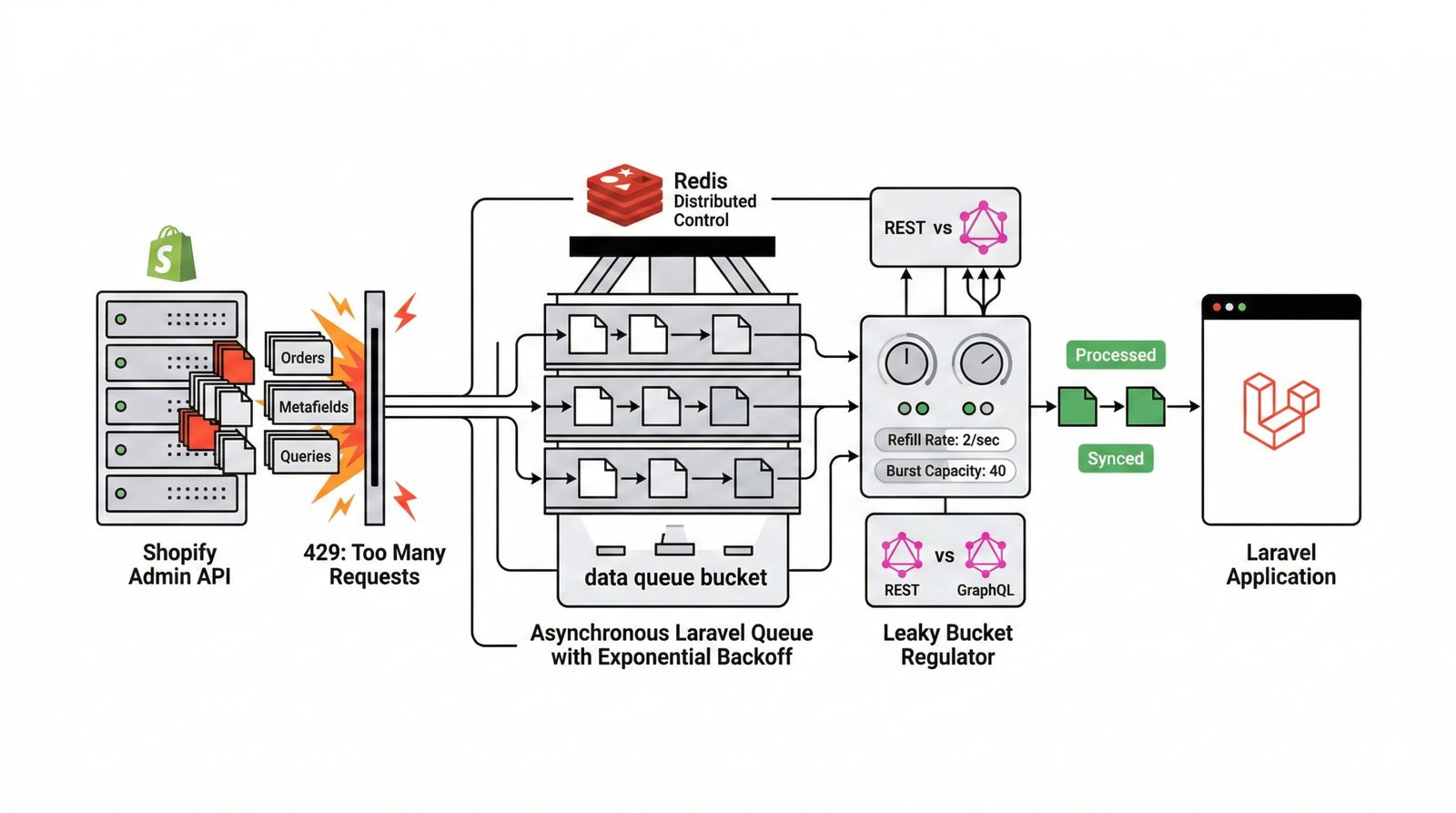
This document outlines a comprehensive 2026 strategy for resolving HTTP 429 'Too Many Requests' errors when integrating a Laravel application with the Shopify API, particularly in production environments. The core of the solution involves implementing a robust, distributed client-side rate limiting mechanism, transitioning non-real-time API calls to asynchronous Laravel queues with exponential backoff and jitter, and strategically utilizing Shopify's webhooks.
Recognizing the Signs of Shopify API Rate Limits
When a Laravel application hits Shopify API limits, several symptoms become apparent:
High Volume of HTTP 429 Status Codes: Errors logged in Laravel's logs and monitoring tools like Sentry.
Growing Backlogs in Laravel Queues: Jobs interacting with the Shopify API accumulate, often visible in Laravel Horizon.
Data Synchronization Delays: Orders, products, or customer info fails to sync between platforms.
Degraded User Experience: Frontend operations dependent on Shopify data become slow or time out.
System Resource Exhaustion: Increased CPU and memory usage due to excessive retries.
APM Alerts: Performance monitoring tools trigger alerts for persistent 429 errors.
Understanding the Triggers for Shopify API 429 Errors
Several factors contribute to hitting Shopify's API rate limits:
Inefficient API Usage
N+1 API Calls: Making individual requests for each item instead of batching.
Lack of Batching: Failing to use Shopify's built-in bulk API capabilities.
Excessive Polling: Continuously querying for changes instead of using event-driven webhooks.
Over-fetching Data: Retrieving more information than is necessary.
Architectural Constraints
Insufficient Client-Side Rate Limiting: Absence of proactive throttling logic in Laravel.
Queue Overload: Too many concurrent workers exceeding the collective API limit.
Absence of Effective Caching: Repeatedly fetching static data directly from Shopify.
Common Pitfalls of Quick Fixes
Developers often attempt short-term solutions that can worsen the problem:
- Increasing queue worker counts without throttling (accelerates limit exhaustion).
- Blindly retrying immediately after a 429.
-
Hardcoding fixed
sleep()delays which are inflexible. -
Ignoring the
Retry-Afterheader provided by Shopify.
Implementing Robust Solutions for Laravel Shopify Integration
A comprehensive solution requires an architectural and operational overhaul.
Architectural Overhaul for API Consumption
Encapsulate Shopify API interactions within a dedicated service layer to centralize rate limiting and error handling.
// Example ShopifyApiService.php
public function getProduct($id)
{
    return RateLimiter::attempt(
        'shopify_api_limit',
        $perSecond = 2,
        function() use ($id) {
            return Http::withToken($this->token)
                ->get("https://{$this->shop}/admin/api/products/{$id}.json");
        }
    );
}
How to Handle HTTP 429 "Too Many Requests" Errors in Laravel
When your Laravel application exceeds Shopify's API limits, the server responds with an HTTP 429 "Too Many Requests" status code. To fix a 429 error, your application must catch the exception and read the Retry-After HTTP header. This header dictates exactly how many seconds your Laravel script must pause (sleep()) or release the job back to the queue before re-attempting the API call.
Distributed Token Bucket: Use Redis to manage API call "buckets" across multiple Laravel instances.
Dynamic Header Parsing: Parse X-Shopify-Shop-Api-Call-Limit to adjust timing.
Exponential Backoff: Configure queue jobs with incremental retry delays to prevent hammering the API.
// Example Job Configuration
public $tries = 8;

public function backoff()
{
    return [5, 15, 30, 60, 120, 240, 480, 960];
}

public function handle()
{
    $response = Shopify::get(...);
    if ($response->status() === 429) {
        $retryAfter = $response->header('Retry-After') ?? 10;
        return $this->release($retryAfter);
    }
}
Optimized API Call Patterns
Prioritize Shopify's Bulk API or GraphQL batch operations for processing multiple records efficiently. Implement local caching using Redis or the database for static or slow-changing data with clear invalidation strategies.
Business Impacts of Unresolved API Limits
Persistent 429 errors have significant business consequences including revenue loss through failed order processing, customer dissatisfaction due to delays, and increased operational costs as teams spend time on manual reconciliation.
Key Strategies for a Resilient Integration
Proactive Throttling: Use Redis for distributed rate limiting.
Asynchronous Operations: Leverage Laravel queues with exponential backoff and jitter.
Embrace Webhooks: Transition from polling to event-driven updates.
Monitor Aggressively: Track API limits and queue health in real-time.
Isolate Environments: Use distinct credentials for staging and production.
Frequently Asked Questions
How do Shopify Admin API limits work?
Typically a leaky bucket model with a refill rate of 2 requests per second and a burst capacity of 40. Always consult the X-Shopify-Shop-Api-Call-Limit header.
GraphQL vs REST for Rate Limits?
GraphQL uses a cost-based model which can be more efficient for complex data needs, but still requires careful client-side management to avoid exhaustion.
