


If you are struggling with a slow Core Web Vitals score on an Elementor or WooCommerce site, you need CMS-specific fixes. When optimizing the largest contentful paint, WordPress developers must look beyond basic plugins. (If you need a refresher on the browser mechanics behind this metric, read our comprehensive guide on How to Fix Largest Contentful Paint (LCP)). Below is the advanced, technical workflow for diagnosing and resolving LCP delays.
This guide outlines an advanced, technical workflow for diagnosing and resolving Largest Contentful Paint (LCP) issues in WordPress, aiming to achieve a Core Web Vitals grade of passing (under 2.5 seconds). It emphasizes moving beyond basic plugin installations to address code and server environment bottlenecks.
Diagnosing the Largest Contentful Paint WordPress Metric
1. LCP Metric and Search Console Alert Identification
- Tool: Google Search Console (GSC) and Google PageSpeed Insights (PSI).
- Process:
- Identify URLs flagged as “Poor” (over 4 seconds) in GSC’s Core Web Vitals mobile reports. Mobile data is crucial due to throttled 4G latency exposing asset discovery issues.
- Cross-reference these URLs in PSI.
- Specific Error to Look For: “No LCP element found.” This often occurs with CSS fade-in animations (e.g.,
opacity: 0) on hero sections, where the browser cannot time the LCP element.
2. Visual Loading and Discovery Audit
- Tool: Chrome DevTools (Network tab, waterfall chart).
- Process:
- Analyze the waterfall chart for the “LCP Request Discovery” warning.
- Pattern to Identify: “Pop-in” patterns, where the DOM loads structural elements and text early, but the primary featured image or hero banner remains blank for seconds.
- Key Insight: The LCP asset must be discovered within the first few milliseconds of parsing the HTML document. Late discovery prevents hitting the 2.5-second threshold.
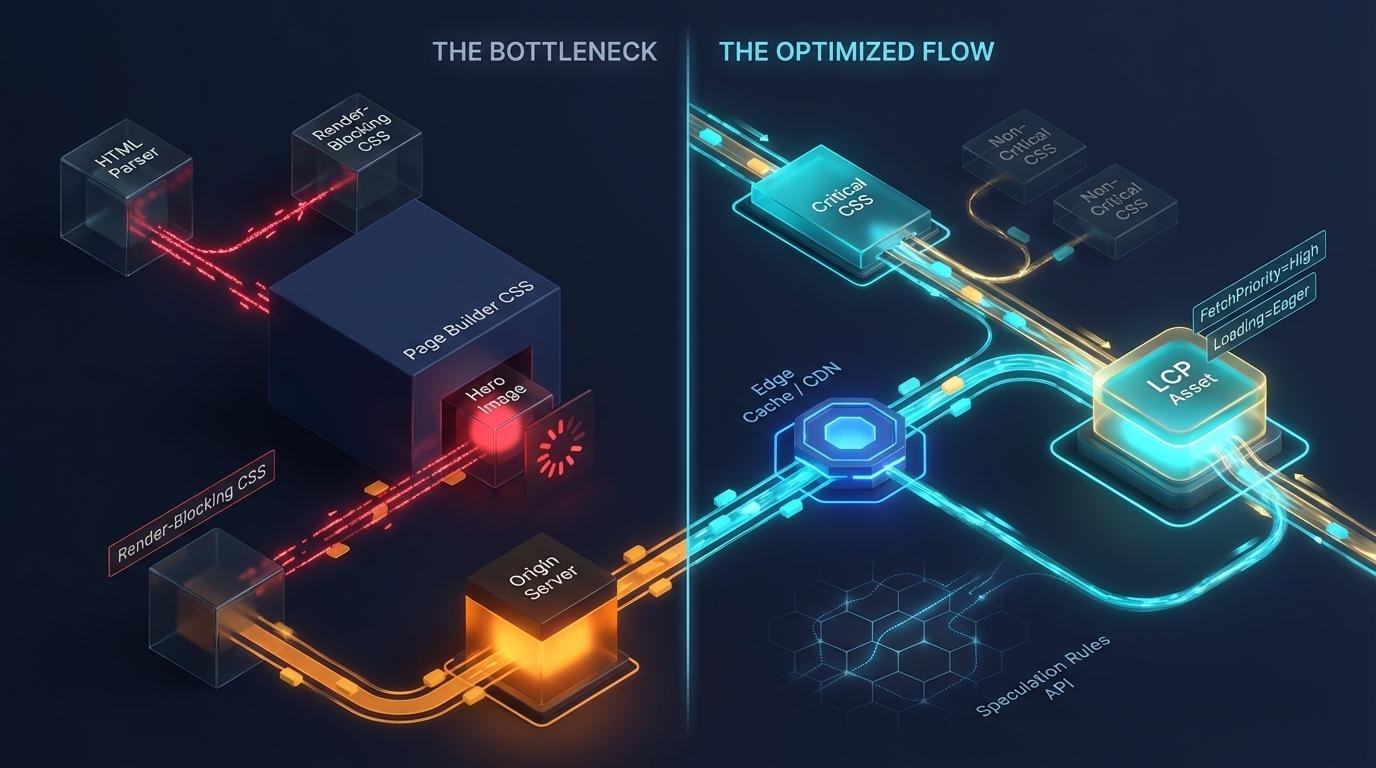
Technical Diagram: Asset Discovery Lifecycle and LCP impact
Identifying the Root Causes of Slow LCP
1. WordPress Core Lazy Loading Interference
Since WordPress 5.5, loading="lazy" is automatically applied to most images. While generally good for performance, this deprioritizes above-the-fold content, including hero images, as the browser delays download until viewport dimensions and scroll position are calculated. This significantly impacts LCP on media-heavy landing pages.
2. Page Builder CSS Discovery Delays
Page builders (Elementor, Divi, WPBakery) often inject hero images via CSS background-image properties within wrapper <div> elements, rather than using <img> tags. The image URL is trapped in dynamically generated CSS files (e.g., post-XX.css). The browser’s preload scanner cannot see it.
The sequential waterfall result: Download HTML → Request Stylesheet → Download Stylesheet → Parse CSSOM → Discover Background Image → Queue Download.
3. Server-Side Rendering Latency (TTFB)
A slow Time to First Byte (TTFB) consumes the entire LCP budget before rendering begins. Unoptimized dynamic queries (e.g., heavy WooCommerce, excessive dashboard widgets, complex analytics plugins) can push TTFB over 600ms, causing subsequent Core Web Vitals to fail.
Failed Fixes: Debunking Generic Optimization Myths
- Aggressive “Lazy Load Everything”: Applying lazy loading to above-the-fold hero images, carousels, or logos guarantees a failing LCP.
- Generic Caching Plugins Without Exclusions: Relying solely on caching or WebP compression without addressing asset discovery delays is ineffective if the browser doesn’t know about the asset until late in the load.
Technical Solutions: How to Fix LCP Issue in WordPress
1. Manual Eager Loading and Fetch Priority
Override default WordPress image behavior by removing loading="lazy" and adding fetchpriority="high" and loading="eager" to the LCP element.
Custom Theme Templates
// Apply fetchpriority and eager loading to a singular post thumbnail
$attr = array(
    'fetchpriority' => 'high',
    'loading'       => 'eager',
);
echo wp_get_attachment_image( get_post_thumbnail_id(), 'large', false, $attr );
Post Grids/Archive Loops
// Eager load only the first image in a custom WordPress loop
$query = new WP_Query( $args );
if ( $query->have_posts() ) {
    $count = 0;
    while ( $query->have_posts() ) {
        $query->the_post();
        $attr = array();

        // Target the first post in the loop for the LCP element
        if ( $count === 0 ) {
            $attr['fetchpriority'] = 'high';
            $attr['loading']       = 'eager';
        } else {
            $attr['loading']       = 'lazy';
        }

        echo wp_get_attachment_image( get_post_thumbnail_id(), 'large', false, $attr );
        $count++;
    }
}
2. Advanced Speculative Prerendering Implementation
Use the Speculation Rules API to prerender internal links in the background for near-instantaneous page loads on click.
// Output Speculation Rules for moderate document prerendering
add_action('wp_head', 'inject_speculation_rules');
function inject_speculation_rules() {
    ?>
    <script type="speculationrules">
    {
      "prerender": [
        {
          "source": "document",
          "where": {
            "and": [
              { "href_matches": "/*" },
              { "not": { "href_matches": "/wp-admin/*" } }
            ]
          },
          "eagerness": "moderate"
        }
      ]
    }
    </script>
    <?php
}
3. Edge Caching and Database Performance
Standard caching writes static HTML to origin disk. Edge Caching (like Cloudflare APO) pushes cached HTML to global CDN nodes, reducing TTFB to 50ms or less.
For Database performance, implement Redis or Memcached:
// Example wp-config.php additions for Redis Object Cache
define( 'WP_CACHE', true );
define( 'WP_REDIS_HOST', '127.0.0.1' );
define( 'WP_REDIS_PORT', 6379 );
define( 'WP_REDIS_TIMEOUT', 1 );
4. Critical CSS and Asset Management
Inject critical rules inline into the <head> via a <style> tag so the browser instantly has CSS to paint the hero section. Defer non-critical styles asynchronously.
For text-based LCP (headings), prevent FOIT (Flash of Invisible Text) with font-display: optional:
/* Prevent FOIT delays on text-based LCP elements */
@font-face {
  font-family: 'PrimaryHeroFont';
  src: url('/wp-content/themes/child/fonts/hero-font.woff2') format('woff2');
  font-display: optional;
}
Diagnostic Checklist for LCP Remediation
Isolate LCP node via PSI
Analyze Waterfall for immediate discovery
Audit Lazy Loading on Hero assets
Verify Fetch Priority High
Inline Critical CSS for Above-fold
Monitor TTFB consistently < 200ms
Frequently Asked Questions
How do I find out which element is my Largest Contentful Paint?
You can identify the LCP element by running your site through Google PageSpeed Insights. Scroll down to the Diagnostics section and look for the entry “Largest Contentful Paint element.” It will highlight the exact HTML element (e.g., <img ...> or <h1> ... </h1>) that the browser considers the largest.
Why is my LCP score 'Poor' on mobile but 'Good' on desktop?
This happens because Google simulates a 4G connection and a mid-tier mobile device for its mobile test. Factors like slow server response time (TTFB), larger image files not being optimized for smaller screens, and render-blocking JavaScript have a much more significant impact on mobile devices with less processing power and slower network speeds.
How do I fix the 'LCP image was lazy loaded' warning?
You must exclude above-the-fold images from lazy loading. Most caching plugins (like WP Rocket, LiteSpeed Cache, or Perfmatters) have a setting where you can “Exclude images from lazy load” by entering their CSS class or filename. You should also add the fetchpriority="high" attribute to your LCP image to tell the browser to prioritize it immediately.
Need expert help?
For persistent LCP issues, professional services can perform deep-dive audits, refactor page builder output, automate Critical CSS, and implement advanced database indexing.
